Chrome addon · Free mobile simulator

Stop wrestling Chrome DevTools device mode

DeviceStage drops a photo-real device stage onto the page you’re already viewing — live preview, multi-device panels, rotate & export — without docking DevTools or guessing from a skinny viewport resize.

Agencies Freelancers QA & designers Front-end developers
DeviceStage overlay showing an iPhone 15 Pro frame with live site preview

The friction DeviceStage removes

Chrome’s built-in device mode is powerful — and a lot of ceremony for a quick responsive check.

Pain

DevTools takes over the window

Open Inspect, toggle device toolbar, pick a preset, reload quirks — then close it all again. Mid-review with a client, that friction stacks up.

Pain

Resize ≠ real device chrome

A skinny browser window doesn’t show notches, status bars, or how the layout feels inside a phone frame stakeholders recognize.

Pain

One device at a time

Comparing iPhone vs Pixel vs tablet usually means flipping presets. Side-by-side checks take screenshots or multiple windows.

What you get instead

Same-tab overlay. Photo-real frames. Local by default.

Benefit

Live preview in-frame

Open any http(s) page, click the icon, and your site renders inside real phone and tablet frames — exact CSS viewports.

Benefit

Multi-device stage

Run panels side by side. Rigid rotate keeps the site upright while the frame turns portrait ↔ landscape.

Benefit

Export without uploading

Export PNG or copy a share-ready preview to the clipboard. No account. Previews stay local unless you choose Export or Share.

Features, with real screenshots

Captured from the actual extension UX — not mocked marketing UI.

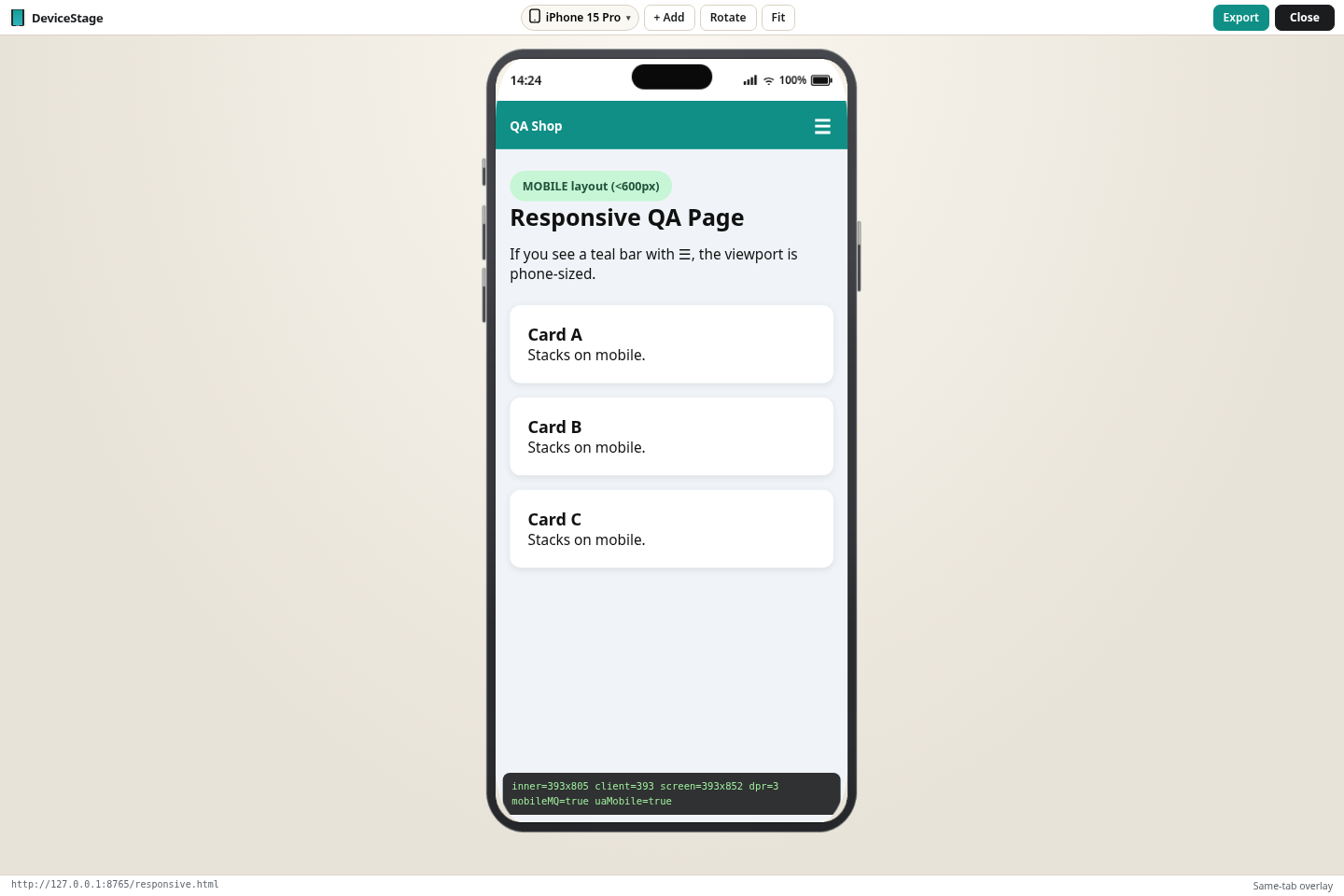
Same-tab overlay

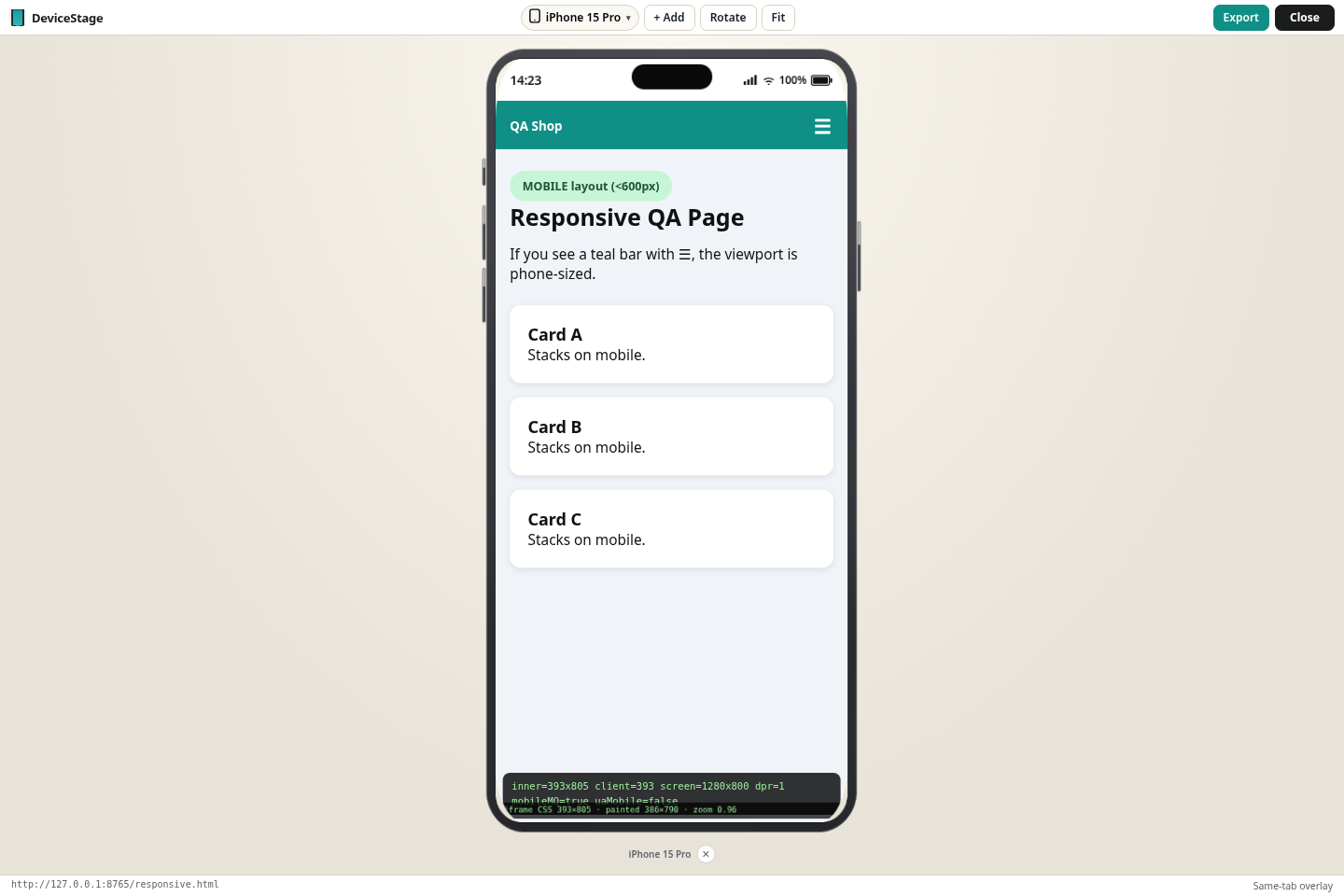
DeviceStage layers a full stage over the current tab. Pick a device, fit the frame, and keep working without leaving the page.

  • Toolbar: device picker, Add, Rotate, Fit
  • Status bar shows URL + “Same-tab overlay”
  • Export or Close when you’re done
DeviceStage single-device overlay on a QA Shop responsive page

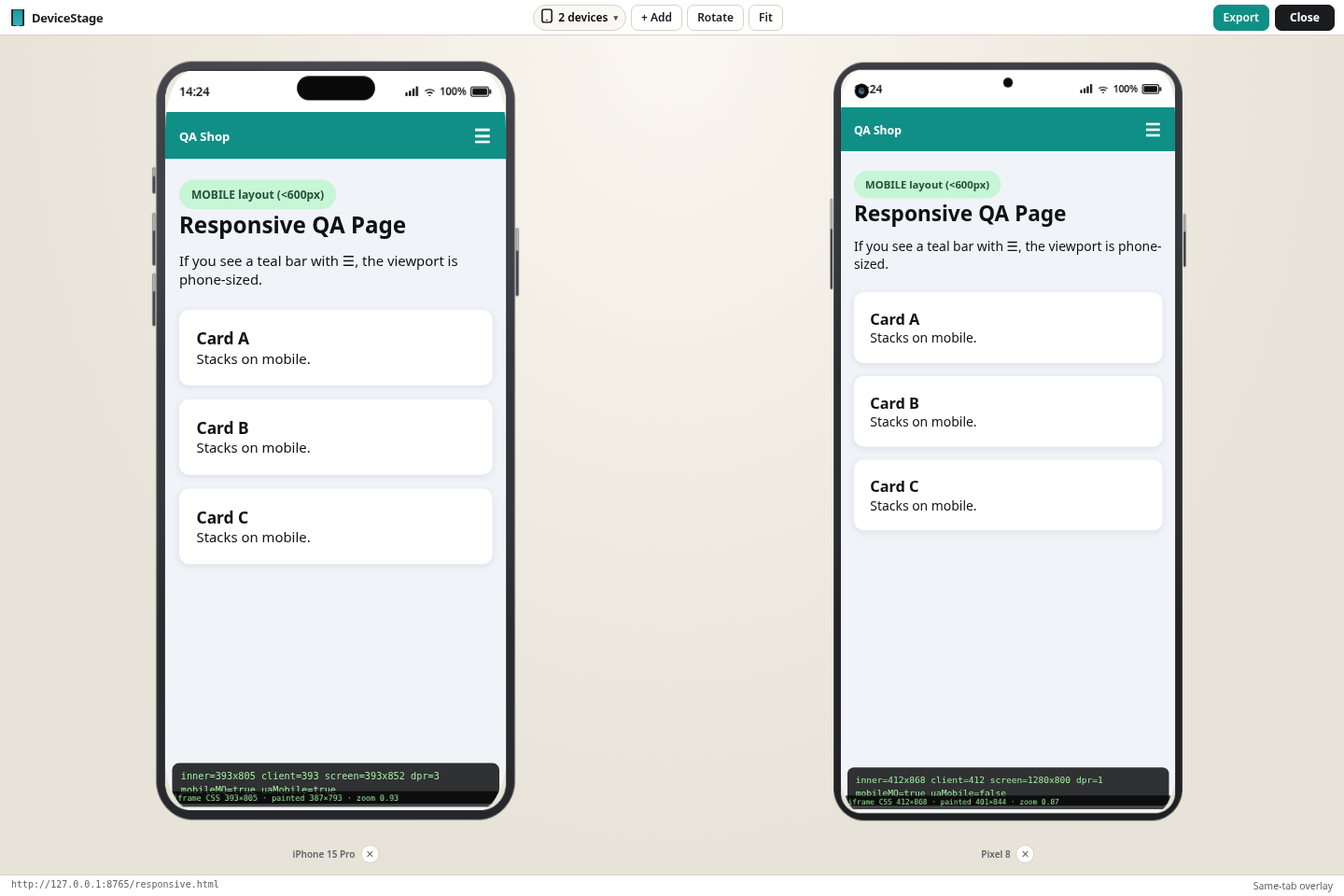
Multi-device stage

Compare layouts across phones at once — e.g. iPhone 15 Pro beside Pixel 8 — with live metrics overlays when you need them.

  • Up to multiple panels side by side
  • Per-device labels and remove controls
  • Great for responsive QA walkthroughs
Two device panels side by side in DeviceStage

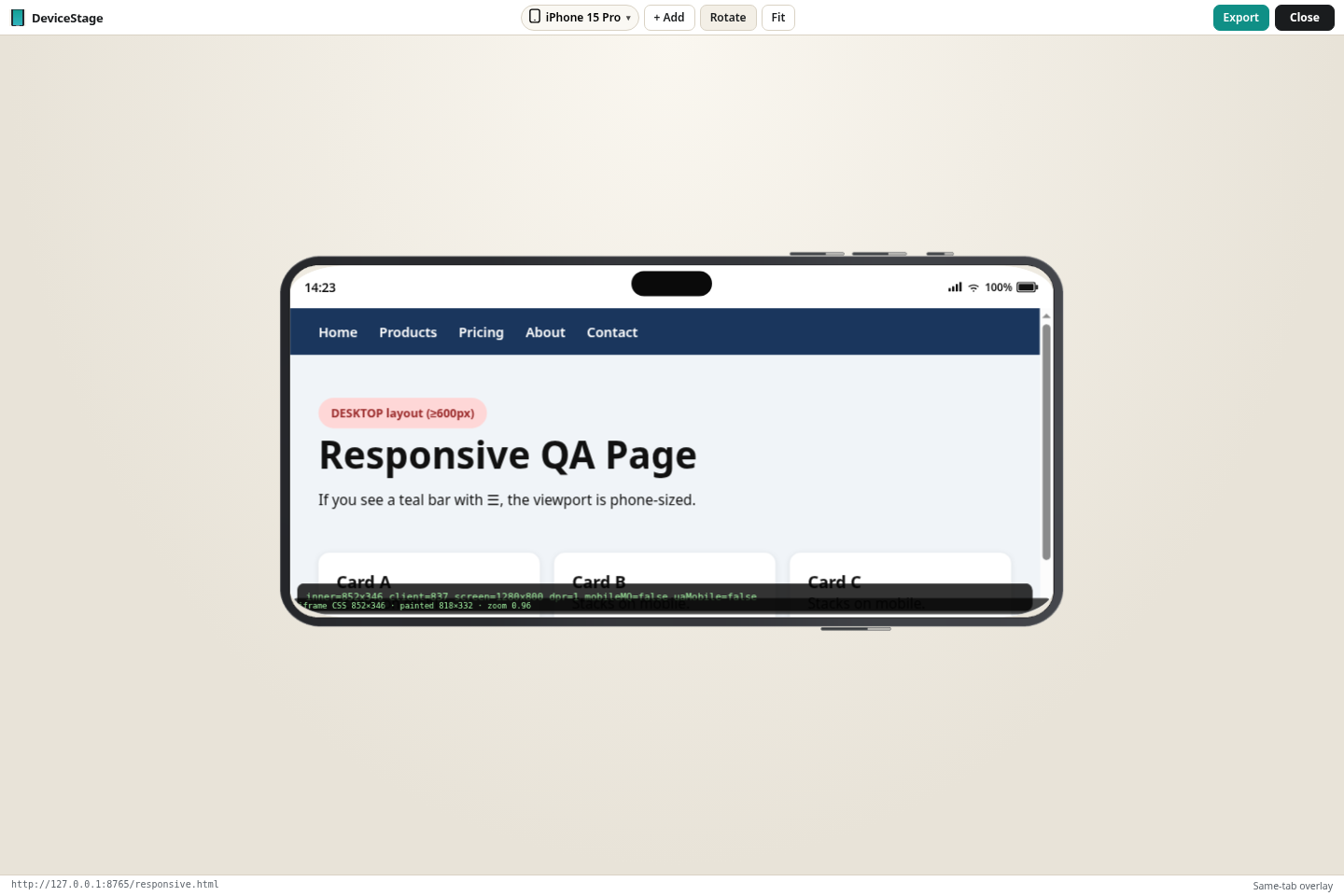
Rotate without the gymnastics

One-click rotate flips the frame while keeping the site orientation sensible — useful when checking landscape breakpoints and sticky headers.

DeviceStage rotate control with device in landscape or portrait
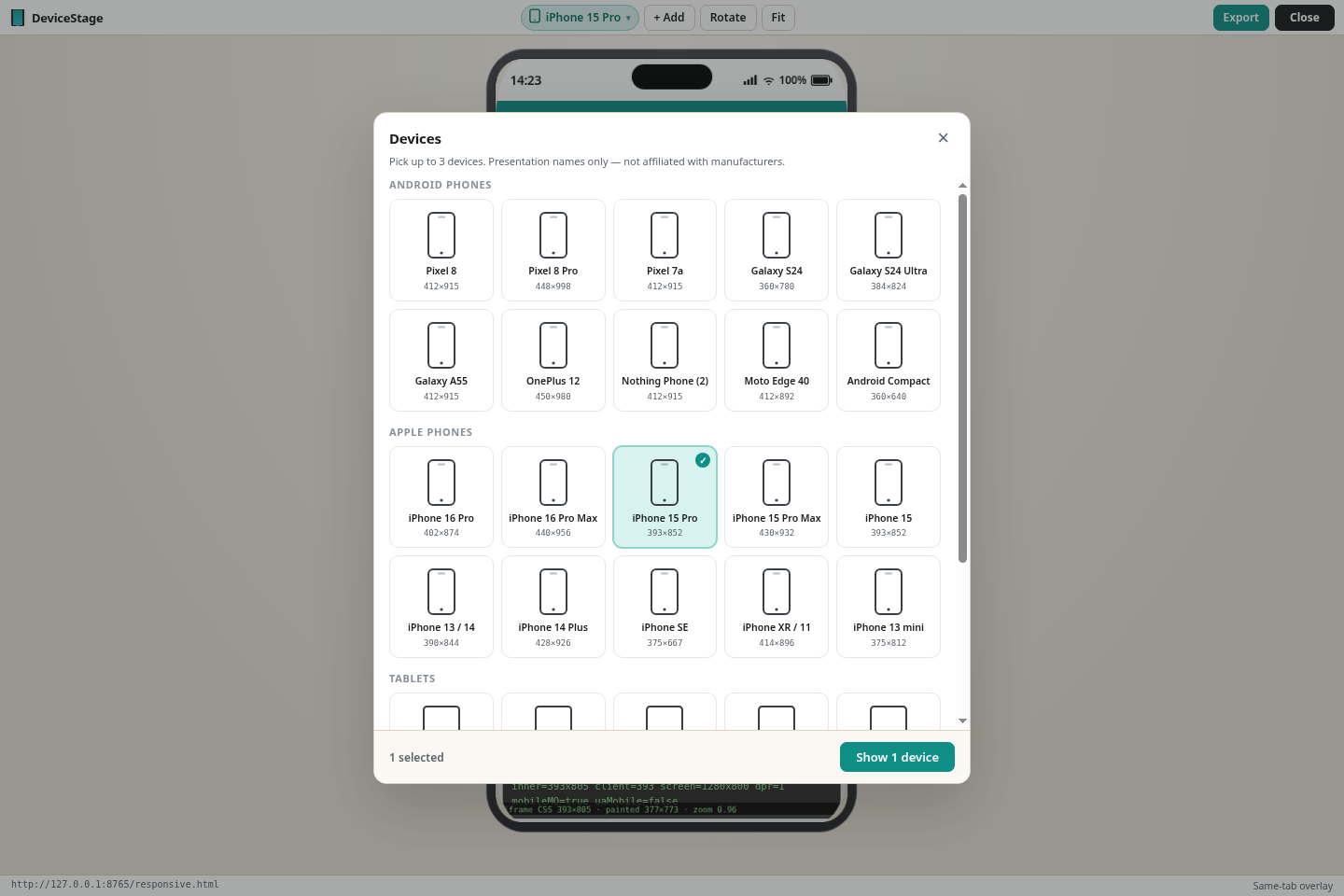
Device picker showing available phone and tablet frames
Device picker Popular iPhones, Galaxies, Pixels, tablets — plus custom size when you need an exact viewport.
DeviceStage status and metrics overlay on a phone frame
Status & metrics Inner/client/screen sizes, DPR, and mobile media-query flags when you’re debugging layout math.

How to use DeviceStage

A short walkthrough from the real product shots.

Install & open a page

Add DeviceStage from the Chrome Web Store. Navigate to any http(s) site you want to preview.

Click the toolbar icon

The same-tab overlay opens with a photo-real frame. Pick a device, Add more panels, Rotate, or Fit.

Export or close

Export a PNG or copy a share-ready preview to the clipboard. Close the overlay when you’re done — nothing uploaded by default.

~12s slideshow · overlay → multi-device → rotate → picker

Add to Chrome

DeviceStage vs Chrome DevTools device mode

Different jobs — DeviceStage is for quick visual checks with real frames.

Topic DeviceStage Chrome DevTools device mode
Where it lives Same-tab overlay on the page Docked DevTools panel
Look & feel Photo-real device frames Viewport rectangle + optional frame chrome
Multi-device Side-by-side panels One preset at a time
Export PNG / clipboard share locally Screenshot via DevTools / OS tools
Best for Client reviews, design QA, quick checks Deep debugging, network, console, sensors

From the studio

Placeholders — honest and generic while we collect real quotes.

“We needed mobile frames clients recognize — without opening DevTools mid-call.”
Example agency workflow · Coming soon
Example placeholder
“Built for agencies & freelancers who ship responsive sites every week.”
WebDev.ai product note
Studio note

FAQ

Is DeviceStage free?

Yes. DeviceStage is a free Chrome extension published by WEB DEV GROUP LTD.

Does it upload my pages?

No. Previews run locally in your browser. Export and Share use your clipboard / local PNG — DeviceStage does not upload shares to a server. See our privacy policy.

Which devices are included?

Popular iPhones, Galaxies, Pixels, and tablets with exact CSS viewports, plus custom size and custom frame slots when you need them.

Why does the Chrome Web Store say pending review?

New listings and updates sometimes show pending review. The listing link still works — use Add to Chrome from the store page when the install button is available.

Does it replace DevTools?

No. Keep DevTools for debugging. Use DeviceStage when you want photo-real frames and multi-device visual checks without the device-mode ceremony.

By WEB DEV GROUP LTD · Chrome Web Store · Privacy: local overlay, clipboard export/share