

The number is the icon
Tab Tracker shows how many tabs you have open as a big, sharp count on the toolbar — with threshold colors, duplicate review, peaks, and search. Built for people who live in 40+ tabs.
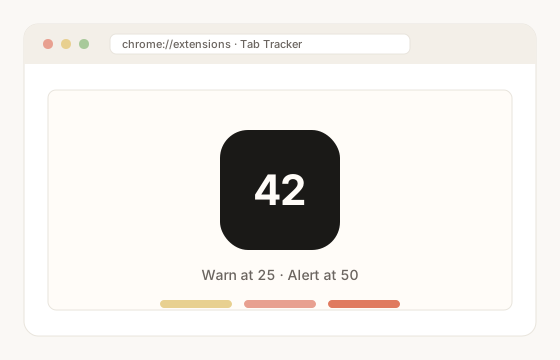
The tab sprawl Tab Tracker makes visible
Chrome lets you open hundreds of tabs — and tells you almost nothing about them.
The toolbar shows nothing useful
Chrome doesn’t tell you how many tabs are open. You find out when the tab strip has shrunk to unreadable slivers.
Duplicates hide under tracking params
The same page opened from an email, a chat, and a search result carries different tracking parameters, so it doesn’t look like a duplicate.
Closing tabs is scary without a review
Bulk-closing risks losing the one tab you still needed. So most people close nothing and the count keeps climbing.
What it does
One job: count, clean, and keep you honest about tab sprawl.
Live count as the icon
Solid black icon, big white digits. Amber at your warn threshold (default 25), red at alert (default 50). Both configurable.
Duplicate review
Smart URL matching (strips tracking params). Side-by-side KEEP vs DUPLICATE. Pinned tabs stay protected. Nothing closes until you confirm.
Search + peaks
Jump to any tab by title or URL. See today’s peak and all-time peak. History auto-prunes after 90 days.
How to use Tab Tracker
Install once, glance at the icon, clean up when the number tells you to.
Install
Add Tab Tracker from the Chrome Web Store. The toolbar icon becomes your live open-tab count.
Watch the count & set thresholds
The icon turns amber at your warn threshold (default 25) and red at alert (default 50). Set both to numbers that fit how you work.
Search or review duplicates
Jump to a tab by title or URL, or run duplicate review: KEEP vs DUPLICATE side by side. Nothing closes until you confirm, and pinned tabs are safe.
FAQ
Is Tab Tracker free?
Yes. Tab Tracker is free on the Chrome Web Store.
Does Tab Tracker send any data?
No. Tabs and settings stay on your machine. No network calls, no analytics, no third parties. See Privacy.
Will it close tabs automatically?
No. Duplicate review is confirm-first — nothing closes until you confirm. Pinned tabs are protected.
What do the threshold colors mean?
The icon is solid black with white digits until you reach your warn threshold (default 25 tabs), where it turns amber. At your alert threshold (default 50) it turns red. Both numbers are configurable.
Who makes this?
Web Dev Group / WebDev.ai (WEB DEV GROUP LTD). Questions: [email protected].
By WEB DEV GROUP LTD · Chrome Web Store · Privacy: no data collected
More from WebDev.ai
Two more free Chrome addons from the same studio.
ClientSnap
Capture a page, mark it up with arrows, boxes, blur, and text, then save locally or send a short link. Recipients open it in the browser — nothing to install.
DeviceStage
Free Chrome mobile simulator — photo-real device frames, live site preview, and a multi-device stage in a same-tab overlay.